Windows Directory Statistics
DownloadWinDirStat is a disk usage statistics viewer and cleanup assistant for Microsoft Windows clients and servers. On start up, it reads the whole directory tree once and then presents it in three useful views:
- The directory list, which resembles the tree view of the Windows Explorer but is sorted by file and subtree size.
- The treemap, which shows the whole contents of the directory tree straight away.
- The extension list, which serves as a legend and shows statistics about the file types.
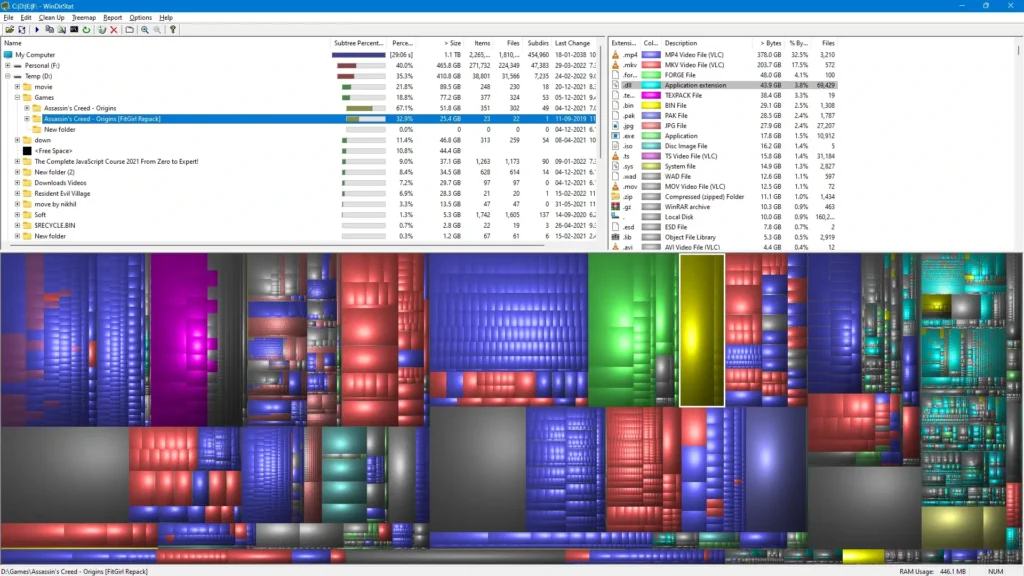
The treemap represents each file as a colored rectangle, the area of which is proportional to the file’s size. The rectangles are arranged so that directories again make up rectangles that contain all their files and subdirectories, so their area is proportional to the size of the subtrees. The color of a rectangle indicates the type of the file, as shown in the extension list. The cushion shading additionally brings out the directory structure.
Frequently asked questions
- What is WinDirStat?
- WinDirStat is a free disk usage analyzer for Microsoft Windows. It shows folder sizes, a treemap of files, and file-type statistics so you can see what is using disk space.
- Is WinDirStat open source?
- Yes. WinDirStat is released under the GNU General Public License version 2 (GPLv2). You may use and redistribute it according to that license.
- Does WinDirStat delete files automatically?
- No. Scanning the disk is read-only. Any cleanup or file deletion happens only when you choose an action in the application.
- How do I install WinDirStat on Windows?
- Download an MSI installer or portable ZIP from the Downloads page, or install with winget (WinDirStat.WinDirStat) or Scoop (extras/windirstat).